
When you're coding an app on Xamarin iOS you have the opportunity to use the class NSURLSession native to make your requests HTTP or the managed .NET API HttpClient API
To facilitate code sharing with other platforms we'll prefer to use the .NET API, which is easier for a .NET developer to use. This implementation has some shortcomings:
- it is less integrated into the OS (e.g. it is limited to TLS 1.0)
- slower (especially in the case of HTTPS requests)
- It requires more managed code: so the executable is larger since, as a result, it embeds all the code of the managed implementation of the API instead of using the OS code.
The Xamarin developers have thought of us and let us choose which implementation of HttpClient API will be used in the compilation.
To specify the implementation, it is very simple.
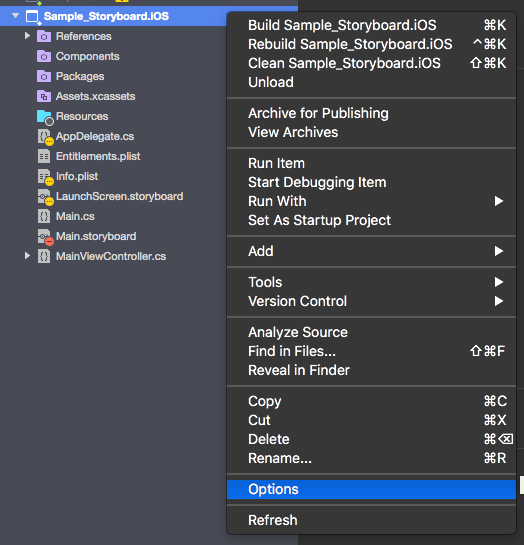 Then select the iOS Build category:
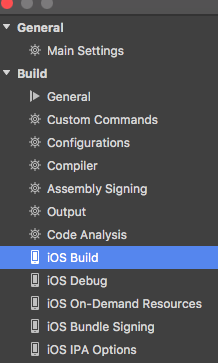 So you can choose to implement HttpClient API in three ways:
- management implementation
- implementation using the native class CFNetwork
- implementation using the native class NSURLSession
CFNetwork:
- improved performance
- executable smaller than with managed implementation
- supports TLS 1.2
- not available on WatchOS
- some functions of HttpClient API are not supported
- Available from iOS 6.0
NSURLSession:
- improved performance
- executable smaller than with managed implementation
- some functions of HttpClient API are not supported
- Available from iOS 7.0
You can also choose to implement SSL/TLS between two options:
- the Apple implementation that supports the TLS implementation 1.0/1.1/1.2
- the Mono implementation that supports the TLS 1.0 implementation
Note that the same thing is available on Xamarin Android.
Happy coding .
To go further: Official documentation