
UWP on iOS and Android was a dream of mine from the moment Microsoft acquired Xamarin.
At Build 2018, it was not Microsoft but nventive that announced Uno Platform, originally an internal tool.
Uno Platform makes it possible to run UWP code written in XAML and C# on Android and iOS. Two playground applications demonstrate the result:
As a bonus, Uno Platform can also create web applications by generating WebAssembly code. You can see a demo here.
Uno Platform is based on Xamarin technology. It competes with Xamarin.Forms, but takes a very different approach: instead of inventing a new XAML dialect, it uses UWP XAML and APIs.
The goal is to develop the application directly with UWP and keep the conveniences provided by Microsoft tooling, such as XAML live reload and C# Edit & Continue. Once development is complete, you verify that the rendering also works well on iOS and Android.
To tell you about Uno Platform I decided to ask the platform developers directly:
First of all, who are you?
We are nventive, a Montreal company originally founded to help professionals build better software with .NET. We have used C# and XAML since the company began, moving from WPF to WPF/E (which became Silverlight), Windows Phone 7 and then WinRT. Alongside our R&D work on tools and frameworks, we gradually became a development agency for the Windows platform.
Afterwards, our clients asked us to develop applications for other platforms. Of course, we did what everyone else did: we tried native development (Objective-C and Java), but we didn't like having multiple teams using different technologies at all.
Little by little, we ported our internal tools with Mono and Xamarin. At first we shared only the application logic and kept a platform-specific UI, but we were not satisfied with the available tools or the need for separate specialist teams. We therefore started a small C# control library whose code could remain nearly identical across platforms.
Since we have demanding customers and our designers are ambitious, we were looking to get something that would allow us both flexible and identical rendering across all platforms. It was becoming increasingly obvious that XAML was the language that would allow us to achieve these goals, but to do that we needed not only to parse XAML, but also generate code to compile.
So we designed Uno Platform as a series of home tools to address our problem while we wait for Microsoft to come up with a platform to which we could migrate.
But what is Uno Platform?
It is a set of tools designed to reproduce the behavior of the Windows UWP XAML user interface on other platforms while retaining each platform’s strengths. Code written for UWP can therefore work almost identically elsewhere.
To convert a UWP application to use Uno Platform, just create the iOS, Android, and WebAssembly projects in the solution and move the UWP code to a « shared project » to be recompiled on each platform.
How does it work internally? Do you use Xamarin Native controls?
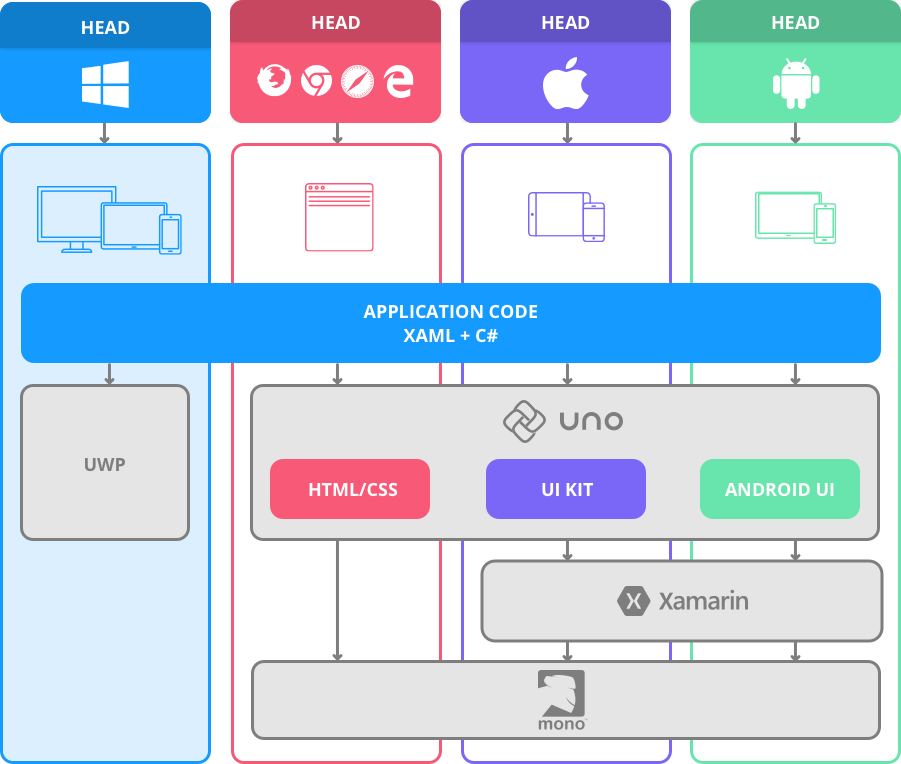
We recreated the complete Windows UWP API surface for version 14393 (Creators Update), then implemented the APIs we needed on iOS, Android and WebAssembly. Visual controls inherit from each platform’s native primitives while adapting their properties and measure and arrange phases to honor the UWP contract.
Uno Platform architecture:
Sources: http://platform.uno
A code generator runs when an Uno Platform project is compiled. It parses the XAML files and generates the initialization code. This builds on a component published earlier that year: Uno.SourceGeneration.
Take the following XAML code:
<StackPanel>
     <TextBlock Text="Hello world!" Foreground="{StaticResource MyColor}" />
</StackPanel>
The generated code will be:
new StackPanel
{
 Children =
 {
   new TextBlock
   {
       Text = "Hello world!",
      Foreground = Application.Resources["MyColor"] as Brush,
   }
 }
}
Of course there is also a dynamic mode that allows code to be parsed during execution using the XamlReader (https://docs.microsoft.com/en-us/uwp/api/Windows.UI.Xaml.Markup.XamlReaderWe have therefore implemented this component which allows dynamic controls to be created during execution.
If I want to use the Telerik suite for UWP or the UWP control toolkit on Uno Platform how can I do that?
We've been running some controls on the Telerik suite with Uno Platform for a while now.
More generally, the UWP API surface is fully defined, allowing any existing software library to be compiled almost unchanged on Uno Platform. Since the UWP API surface is particularly large, it may be that these software libraries rely on APIs not implemented in Uno Platform. In this case, the underlying platform can be used directly.
How did you manage to make UWP usable on iOS and Android?
Iteratively, as we needed it for the development of our applications we tried to implement the UWP APIs and adapt them to the platform.
Is it possible to use the native renders of each platform?
Uno Platform supports the creation of native controls directly in the XAML through the Control Templating However, this approach reduces the possibility of having an identical rendering (pixel perfect) very often sought by designers
Uno Platform was built on the possibility of having a hybrid mode (xaml vs. native). We have used this approach on several occasions to use publicly available controls without having to reimplement them.
Do you have any examples of applications working with Uno Platform?
We currently have the Gallery application (which contains the noUno Platform Playground) open to the public, but we cannot yet disclose the names of our clients' applications for privacy reasons.
Do you have a public roadmap?
It has not yet been formalized, because we want to gauge the reaction of the community to guide our development.
How many apps have you created with Uno Platform?
More than 150.
How long did it take you to create Uno Platform?
Several years.
How many people are working on Uno Platform right now?
A dozen or so.
How many people use it internally?
More than 75.
Did Microsoft's teams help you set up this Framework?
I'm not.
How do we divide the code between different OSes?
The easiest way is to make a « Shared Project » in Visual Studio and include it in all platforms.
If it is a component, there is a way to use the new functionality of the dotnet core projects that compile simultaneously to different platforms.
We are already using this approach in the Uno.Core project (https://github.com/nventive/Uno.Core/blob/master/src/Uno.Core/Uno.Core.csproj) which targets both the platforms AP UAP10.0 , « net46 » and netstandard2.0 .https://www.nuget.org/packages/Uno.UI) also has these additional platforms as targets: MonoAndroid6.0 », MonoAndroid7.0 », MonoAndroid7.1 », MonoAndroid8.0 and Xamarin.iOS1.0 .
Have you planned on sharing its code through a standard .NET project?
No, we prefer the source code sharing and partial class approach.
If I want to use a native control from a platform that doesn't exist in XAML?
There are ways to use aliases for namespace This is conditional XAML per platform.
In the code that has been published, you can see that there are prefixes for namespaces of the typeandroid:XXXOrios:XXX”.
Are you going to make it open source?
Yes, we are making the entire Uno Platform open source.
The work needed to adapt the different aspects of the platform is colossal. There are many controls, features that are not yet supported and we are still looking for a way that would allow third parties to provide specific implementations of UWP's APIs. For example, if you want to use the APIs to make NFC, it is not implemented because we didn't need it. We want it to be possible for third parties to provide an implementation.
My Conclusion
This announcement has created a mini debate in the Xamarin community: Do we really need a second graphical framework for Xamarin?
To me Uno Platform seems much simpler than Xamarin Forms, which requires the creation of many renderers.
However, with Uno Platform, if the visual of a control is not suitable, you can change its template as on UWP.
We're also much closer to rendering: the idea of Pixel Perfect” – having the same rendering to the nearest pixel on all three platforms – is also very interesting.
The Uno Platform teams seemed extremely motivated to popularize their tool, with the developers even taking the time to answer my questions.
Thanks again to the Uno Platform team and especially to Carl for taking the time to answer my questions.
I personally look forward to testing this tool more closely on a more consistent application.
Happy Coding 😀
To go further:
- The official website of Uno Platform: https://github.com/nventive/Uno
- The WASM demo (alpha PC only at the time of writing): http://platform.uno/Playground/index.html
- Link to the Playground: https://github.com/nventive/Uno.Playground
- Develop your cross-platform apps for iOS, Android and Windows