
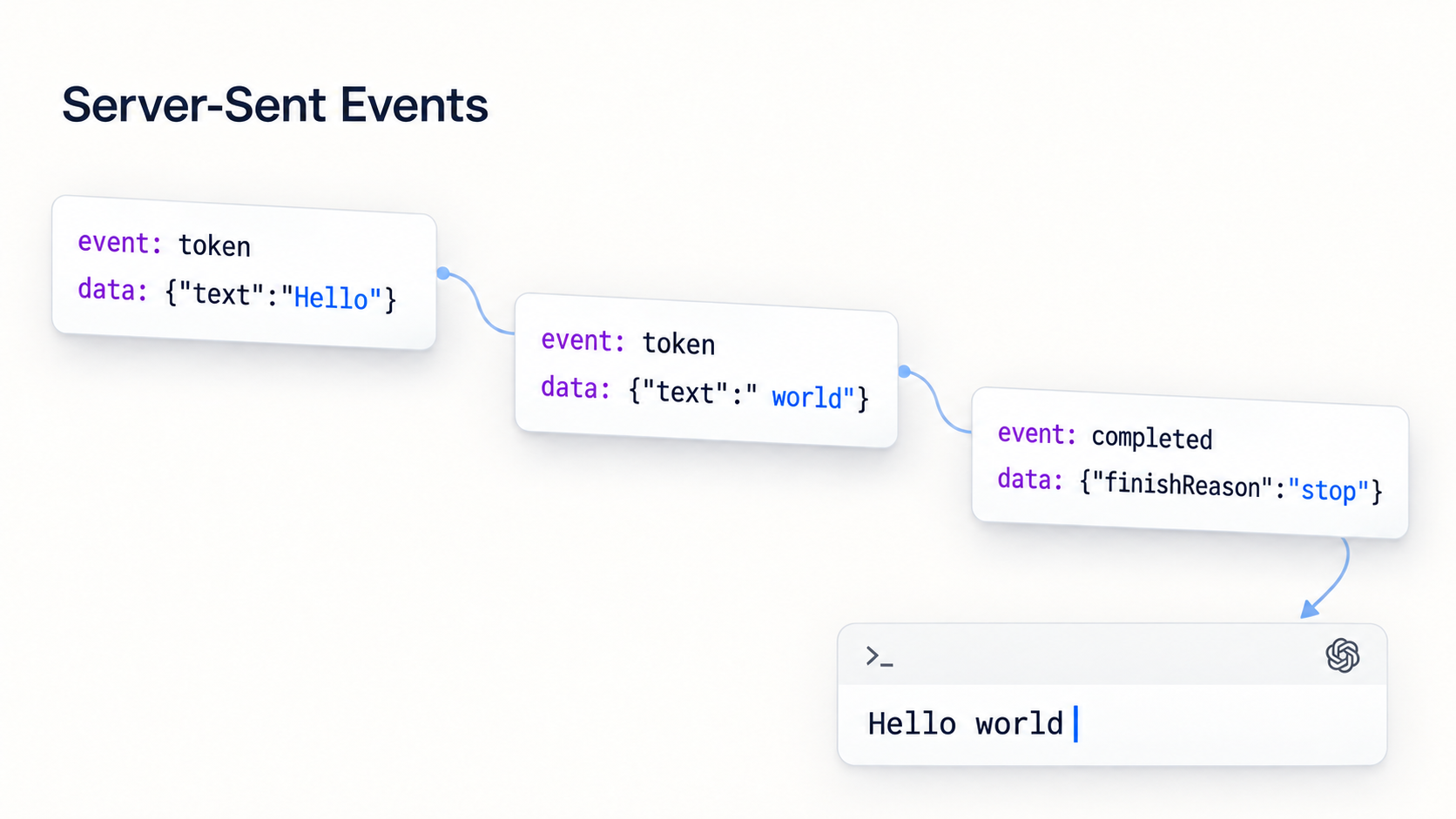
When ChatGPT or another assistant displays its response one word at a time, you might assume that a sophisticated WebSocket must be hiding behind the interface.
The reality is often much simpler: an HTTP request whose response remains open and delivers events as they become available. This mechanism has a name: Server-Sent Events, or SSE.
SSE is neither new nor exclusive to artificial intelligence. Its specification was published as a W3C Recommendation on February 3, 2015. It has long been used to display notifications, logs, job progress, or real-time dashboard data. But the massive growth of AI APIs has given it a particularly well-deserved second life.
What are Server-Sent Events?
With a traditional HTTP request, the client calls a server, waits for the complete response, reads it, and then the connection can be reused or closed.
SSE starts in exactly the same way: the client opens an HTTP request. The server responds with the text/event-stream content type, but it does not immediately complete the response. Instead, it keeps the stream open and writes new events as soon as they become available.

One HTTP request, multiple events: the client processes each fragment as it arrives. The names token and completed are specific to this example; SSE does not prescribe them.
A response can look like this:
event: token
id: 42
data: {"text":"Hello"}

event: token
id: 43
data: {"text":" everyone"}

event: completed
data: {"finishReason":"stop"}
The blank line matters: it marks the end of an event. Each event can contain several fields defined by the protocol:
datacontains the payload, usually text or JSON;eventgives the event a type, such astoken,progress, orcompleted;ididentifies the event and can help resume an interrupted stream;retrysuggests how long the client should wait before reconnecting;- a line beginning with
:is a comment, often used as a heartbeat to prevent intermediaries from treating the connection as idle.
Multiple consecutive data lines belong to the same event and are joined with a line feed.
The protocol is unidirectional: once the request has been sent, events flow from the server to the client. This does not mean that SSE is limited to GET requests. An AI API can receive a prompt in a POST request and then stream its response through the body of that same HTTP request. The browser's native JavaScript EventSource API, on the other hand, is primarily designed around GET.
SSE, polling, or WebSocket?
These three solutions address similar but not identical needs.
With polling, the client regularly asks the server whether new data is available. It is easy to understand, but it multiplies unnecessary requests and adds latency that can last until the next poll.
A WebSocket opens a bidirectional channel: the client and server can send messages to each other at any time. This is ideal for a multiplayer game, a collaborative editor, or a truly interactive two-way conversation.
SSE occupies a very useful middle ground:
- a standard HTTP connection;
- events received as soon as they are emitted;
- a text format that is easy to inspect;
- no bidirectional layer to manage when only the server needs to push data.
In other words, if the client sends a command and then listens for a sequence of results, SSE is often exactly the right tool. There is no point in building an eight-lane highway when all the traffic is moving in the same direction.
Why AI providers use SSE so much
Generating a response with a model can take several seconds, and sometimes much longer. Waiting for the entire text to be produced before displaying anything makes the application feel frozen.
When streaming is enabled, the API sends chunks as soon as they are available. The user sees the beginning of the response quickly, even though the total generation time does not change. What improves most is the time to the first visible result, and therefore the perceived responsiveness of the application.
SSE can also carry much more than text:
- the creation of the response;
- successive text deltas;
- function or tool call arguments as they are being built;
- a state change;
- usage information;
- the end of the generation or an error.
This is precisely the model adopted by many providers. The OpenAI Responses API emits Server-Sent Events when stream is set to true. The Mistral Chat API can send tokens as events until the final [DONE] message. The Gemini API, meanwhile, provides streamGenerateContent to return chunks of a response as they are generated.
The choice makes sense: the client sends a prompt once, then the server produces an ordered sequence of events. A unidirectional HTTP connection is enough for most use cases.
Producing SSE with ASP.NET Core
Starting with .NET 10, ASP.NET Core can natively return an SSE stream with TypedResults.ServerSentEvents. A complete Minimal API can fit in just a few lines:
using System.Runtime.CompilerServices;

var builder = WebApplication.CreateBuilder(args);
var app = builder.Build();

app.MapGet("/events", (CancellationToken cancellationToken) =>
{
    return TypedResults.ServerSentEvents(
        GetEventsAsync(cancellationToken),
        eventType: "message");
});

app.Run();

static async IAsyncEnumerable<string> GetEventsAsync(
    [EnumeratorCancellation] CancellationToken cancellationToken)
{
    for (var index = 1; index <= 10; index++)
    {
        yield return $"Event number {index}";
        await Task.Delay(TimeSpan.FromSeconds(1), cancellationToken);
    }
}
ASP.NET Core takes care of the text/event-stream format and writes each value to the response without waiting for the enumeration to finish. The CancellationToken is essential: if the client closes the connection, the server should stop doing work that is no longer useful.
You can also return SseItem<T> values to define the type, identifier, and structured data of each event. Objects other than strings are then serialized as JSON.
Consuming an SSE stream in .NET
.NET 10 also provides SseParser in the System.Net.ServerSentEvents namespace. To consume the stream correctly with HttpClient, you need to request the response as soon as its headers are available, retrieve its Stream, create the parser, and then enumerate it:
using System.Net.Http.Headers;
using System.Net.ServerSentEvents;

using var httpClient = new HttpClient();
using var cancellationSource =
    new CancellationTokenSource(TimeSpan.FromMinutes(1));

var cancellationToken = cancellationSource.Token;

using var request = new HttpRequestMessage(
    HttpMethod.Get,
    "https://localhost:5001/events");

request.Headers.Accept.Add(
    new MediaTypeWithQualityHeaderValue("text/event-stream"));

using var response = await httpClient.SendAsync(
    request,
    HttpCompletionOption.ResponseHeadersRead,
    cancellationToken);

response.EnsureSuccessStatusCode();

await using var stream =
    await response.Content.ReadAsStreamAsync(cancellationToken);

var parser = SseParser.Create(stream);

await foreach (var item in parser.EnumerateAsync(cancellationToken))
{
    Console.WriteLine($"[{item.EventType}] {item.Data}");
}
The detail you absolutely must not miss is HttpCompletionOption.ResponseHeadersRead. Without it, HttpClient normally considers the operation complete only after it has read all the content. An SSE stream can remain open for minutes or hours: waiting for it to end before processing it defeats the entire purpose of streaming.
This code works and uses the native APIs. But you still need to create the request, set the Accept header, choose the correct reading mode, validate the response, open the stream, and connect the parser. And that is only the happy path: in a real application, you must also decide how to handle cancellation, network errors, and possible reconnections.
With Tiny.RestClient, it is much, much simpler
I introduced the library’s basics in my earlier article about Tiny.RestClient.
Version 2.0 of Tiny.RestClient on GitHub natively supports Server-Sent Events on .NET Standard 2.1, .NET 8, and .NET 10.
The package is available on NuGet:
dotnet add package Tiny.RestClient --version 2.0.0
Consuming the same endpoint becomes:
using Tiny.RestClient;

var client = new TinyRestClient(
    new HttpClient(),
    "https://localhost:5001");

await foreach (var sse in client
    .GetRequest("events")
    .ExecuteAsSSEAsync(cancellationToken))
{
    Console.WriteLine($"id    : {sse.Id}");
    Console.WriteLine($"event : {sse.Event}");
    Console.WriteLine($"data  : {sse.Data}");
    Console.WriteLine($"retry : {sse.Retry}");
}
That is all.
ExecuteAsSSEAsync opens the streaming connection and returns each event as soon as it is received through an IAsyncEnumerable<ServerSentEvent>. The response is not buffered while waiting for it to end. The standard protocol fields are directly available through Data, Event, Id, and Retry, while comments and unknown fields are ignored.
The API operates on the Tiny.RestClient request itself, so it remains compatible with its verbs, headers, authentication, and content. For a generic AI API using a POST request, the principle remains the same:
var body = new
{
    model = "my-model",
    input = "Explain Server-Sent Events to me",
    stream = true,
};

await foreach (var sse in client
    .PostRequest("v1/generate", body)
    .WithOAuthBearer(apiKey)
    .ExecuteAsSSEAsync(cancellationToken))
{
    Console.WriteLine($"{sse.Event}: {sse.Data}");
}
The contents of Data naturally depend on the provider and usually need to be deserialized from JSON. Tiny.RestClient handles the SSE transport here; your code remains responsible for the semantics of the events specific to the API being called.
Things to watch in production
SSE is simple, but a long-lived connection deserves a few precautions:
- always pass a
CancellationTokenand cancel it when the user leaves the screen or stops the generation; - reuse
HttpClient, ideally through dependency injection, instead of creating one for every call; - check the timeouts configured on proxies, load balancers, and gateways in front of the API;
- disable response buffering in intermediaries that enable it;
- send heartbeats if the stream can remain silent for a long time;
- plan a reconnection strategy when the use case requires one, taking
retryand the last receivedidinto account; - treat every
datapayload as external input: validate the JSON and handle new event types without bringing down the entire stream.
Automatic reconnection is part of the browser EventSource API's behavior, but it is not provided by every SSE client. With a .NET client, this policy should be explicit to avoid both silent disconnections and aggressive reconnection loops.
Conclusion
SSE is basically an HTTP connection that hasn't finished telling you its life story. And with Tiny.RestClient, one request and an await foreach are all you need to listen.
I use SSE a lot in iolys. Let's just say my passion for blank lines in a protocol wasn't the only reason I wrote this article.
By the way, have I told you about iolys?
I'll save that for another article :) Even with streaming, I'm not going to send you everything at once!
Further reading
- Tiny.RestClient: a REST client for consuming your APIs: my introduction to the library, published in 2018.
- Tiny.RestClient on GitHub: the library’s source code and documentation.
- The WHATWG SSE specification: the current reference for the event format,
EventSource, and reconnection rules. - SSE support in ASP.NET Core 10: Microsoft’s documentation for producing a stream with
TypedResults.ServerSentEvents.
Happy coding 🙂